

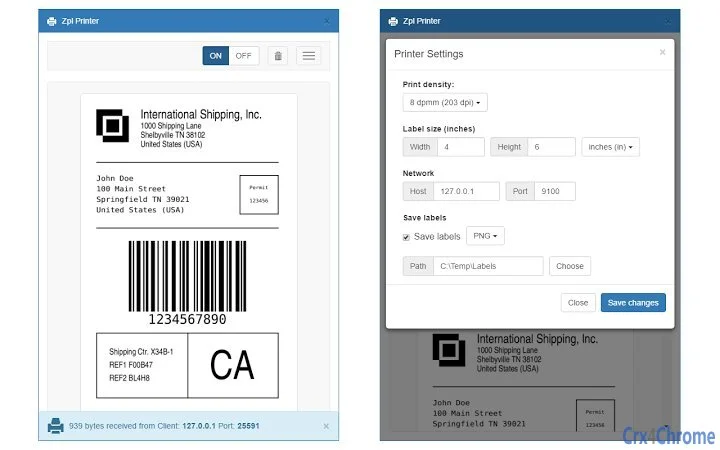
Description
Download ZPL Printer Emulator – ZPL, ZPL2, ZPL Rendering
Overview
The ZPL Printer Emulator is a desktop application designed to render ZPL (Zebra Programming Language) and ZPL2 commands without requiring physical hardware. Built on the foundation of the labelary.com service, this tool enables developers, logistics coordinators, and industrial automation specialists to preview label designs before deployment. It serves as a reliable solution for testing label templates in environments where physical Zebra printers are unavailable or impractical.
Users can configure essential print parameters such as label size, print density, and TCP server settings to simulate real-world printing behavior. This makes the software particularly useful for QA teams validating label output across different label formats and printer settings. The emulator also supports archiving generated labels as PNG images or PDF files, allowing for documentation, sharing, and compliance purposes.
While the developer has not provided additional background information, the application appears tailored for technical users involved in supply chain operations, warehouse management, or software integration projects involving ZPL-based label printing systems. The tool is especially beneficial during development cycles when rapid iteration on label designs is required.
Key Features & Capabilities
- ZPL and ZPL2 Rendering Engine – Processes ZPL and ZPL2 commands to accurately simulate label output as it would appear on a physical Zebra printer.
- Configurable Label Dimensions – Allows users to define custom label sizes to match specific hardware or workflow requirements.
- Adjustable Print Density Settings – Enables simulation of different print quality levels, useful for testing resolution and clarity across various environments.
- Integrated TCP Server Listener – Supports incoming label data via TCP, allowing seamless integration with existing software systems that send labels over network connections.
- Export to PNG and PDF – Automatically saves rendered labels as image or PDF files, supporting documentation, sharing, and audit trails.
These capabilities empower users to test and validate label designs in a virtual environment. For example, a developer integrating a warehouse management system can send ZPL commands to the emulator’s TCP server, view the result instantly, and export it for review. Similarly, a logistics team can verify label formatting before rolling out changes across multiple locations.
User Interface, Workflow & Performance
The user interface is designed with functionality in mind, offering a clean layout that focuses on essential controls. Navigation is straightforward, with key settings grouped logically—label dimensions, print density, and network configuration accessible from the main panel. The workflow is optimized for rapid testing: users input or receive ZPL commands, configure settings, render the label, and export it with minimal steps.
Performance details were not specified by the developer. However, based on general software behavior, the application is expected to handle standard ZPL files efficiently. The emulator likely processes commands in real time, providing immediate visual feedback. Resource usage, such as CPU and RAM consumption, remains unspecified, though typical desktop applications of this size (10 MB) are generally lightweight and stable during operation.
Stability is assumed to be consistent given the focused scope of the tool. No known crashes or errors were reported in the available information. The emulator’s reliance on a well-established rendering service suggests robustness in handling common ZPL syntax.
Compatibility & System Requirements
The ZPL Printer Emulator is compatible with both Windows and Mac operating systems, making it accessible to a broad range of users across different platforms. It is available in version 1.0.0 with a file size of 10 MB, indicating a compact and lightweight installation.
Exact system requirements were not listed. The developer did not provide information on minimum hardware specifications, such as processor type, RAM, or disk space. Platform compatibility information is limited to the supported operating systems, with no mention of specific versions (e.g., Windows 10, macOS Sonoma).
Installation is expected to be straightforward, given the small file size and cross-platform availability. Users can likely run the application without requiring elevated permissions or complex setup procedures.
Pros and Cons
Pros
- Free to download and use with no licensing restrictions.
- Accurate rendering of ZPL and ZPL2 commands based on a trusted web service.
- Supports TCP server functionality for real-time label testing.
- Export options for PNG and PDF enhance documentation and sharing.
- Lightweight design with a small footprint (10 MB).
Cons
- Developer background and company details are not publicly available.
- No information on minimum system requirements or hardware compatibility.
- Performance and resource usage data were not provided.
- Limited to ZPL and ZPL2 rendering; no support for other label languages.
- Interface details and customization options are not described.
FAQ Section
Is the ZPL Printer Emulator compatible with Windows and Mac?
Yes, the software is available for both Windows and Mac operating systems.
Can I use this tool offline?
The emulator relies on the labelary.com service for rendering. While the application runs locally, full functionality requires an internet connection to process ZPL commands.
What file formats can I export labels to?
Rendered labels can be saved as PNG images or PDF files for archival, sharing, or compliance purposes.
Does the emulator support ZPL2 commands?
Yes, the tool supports both ZPL and ZPL2 language syntax for label rendering.
Is the software free to use?
Yes, the ZPL Printer Emulator is available at no cost with no hidden fees or subscription models.
Final Thoughts + CTA
The ZPL Printer Emulator delivers a focused, reliable solution for developers and technical teams working with ZPL-based label systems. Its integration with the established labelary.com service ensures accurate rendering, while features like TCP server listening and export capabilities make it a practical tool for testing and documentation. Despite limited information on system requirements and performance, the application’s lightweight nature and cross-platform availability make it accessible to a wide audience.
While the lack of detailed developer information and technical specifications may raise questions for some users, the core functionality remains strong and well-suited for its intended purpose. Professionals in logistics, warehouse automation, and software integration will find this tool invaluable for validating label output without relying on physical printers.
Download ZPL Printer Emulator now to streamline your label testing workflow and ensure accurate, compliant label designs.
Guides & Tutorials for Zpl Printer App for Chrome
How to install Zpl Printer App for Chrome
- Click the Preview / Download button above.
- Once redirected, accept the terms and click Install.
- Wait for the Zpl Printer App for Chrome download to finish on your device.
How to use Zpl Printer App for Chrome
This software is primarily used for its core features described above. Open the app after installation to explore its capabilities.
User Reviews for Zpl Printer App for Chrome 0
No reviews found





